



Microsoft 365 Copilot: Intelligent Support for the Modern Business
Today, AI advancements have made a great impact on almost every industry in Saudi Arabia. Modern businesses are benefiting from these smart solutions and improving their productivity. Unlike before, their teams don’t have to struggle with heavy workloads, scattered information, and constant switching between tools.
This means their daily tasks can be automated with the right solution. Businesses are now looking for smarter ways to manage work, and Microsoft 365 Copilot is a solution they can trust.
This AI-powered tool has eliminated complexity and reduced manual effort to help teams stay focused. This tool is designed to help modern workplaces operate smartly.It helps teams work faster and with better clarity, as it supports everyday tasks across Microsoft apps.
Many trusted providers of IT support in Saudi Arabia also suggest Copilot for modern workplaces, as it makes work more organized. Keep reading everything about this advanced tool and how it is helping modern Saudi businesses.
Table of Contents
What Is Microsoft 365 Copilot?

Before we understand how Microsoft 365 Copilot solutions is helping modern workplaces, let’s know what it really is. This intelligent tool is an AI-powered assistant integrated into Microsoft 365 apps, like Word, Outlook, and others. It helps users create content, analyze information, summarize data, and manage tasks faster.
It not only automates tasks but also helps with better data protection. Teams of modern Saudi businesses don’t need to switch between tools, as with this smart AI tool, they get help inside their daily apps. By understanding the context from emails, files, and meetings, Copilot reduces manual work and errors, helping teams focus more on important tasks. You can connect with a trusted provider of IT services in Saudi Arabia to get more information about its features and benefits.


How Microsoft 365 Copilot Works
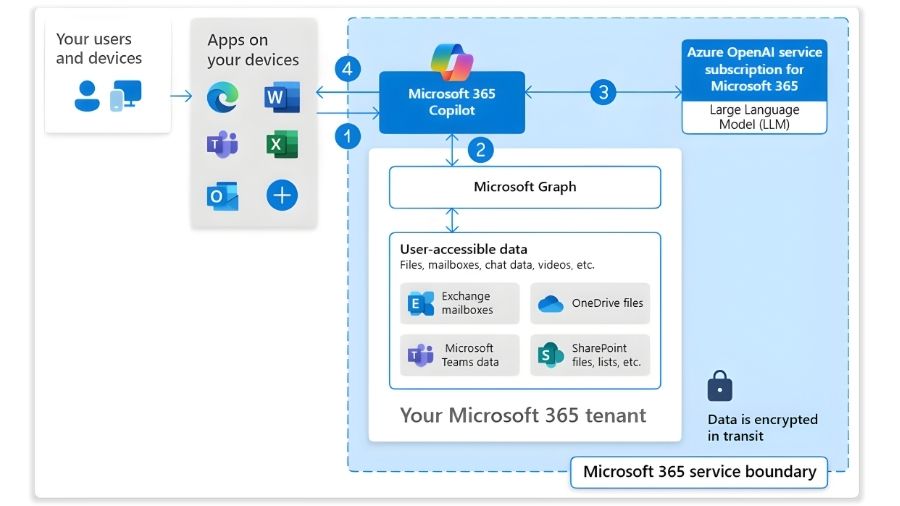
The best part about using Microsoft 365 Copilot is that this tool only accesses data that you already have permission to see. It understands your current work, like an open document or meeting, and offers highly relevant help. Your conversation, prompts, or specific data you input are used only to generate answers and not to train the base LLM.
This means the base model doesn’t remember your data.
- Combines Your Work Data: Microsoft 365 Copilot connects to your emails, files, chats, and meetings to understand how your work is linked across different tools. This helps it to provide support based on real work context, not isolated data.
- Uses Advanced AI Models: It uses powerful LLMs, like those from OpenAI, to understand requests and generate clear answers or responses. It helps with writing, summarizing, and explaining data and information. With this, modern workplaces can make everyday tasks faster and more accurate.
- Provides Context-Based Help: It works directly inside the app you are using. This means you no longer need to switch between tools and apps. This offers suggestions that match your current task or document and help you save time.
Key Advantages of Microsoft 365 Copilot
Many trusted providers of IT support services in Saudi Arabia recommend Copilot for modern businesses. This smart tool automates routine and time-consuming tasks and helps teams to focus on high-impact and creative work.
Here are the main benefits of using this AI-powered tool:
1. Boosted Productivity and Time Savings
With this technology, you can easily automate your repetitive tasks, like creating the first draft of emails and summarizing long documents. Instantly generating first drafts and meeting summaries helps you finish your work quickly. The work that usually takes hours can be completed in just a few minutes. This helps the team to focus better on the creative parts of their job.
2. Streamlined Workflows
This integrates smoothly within the apps you already use for daily tasks, like Excel, PowerPoint, Outlook, and Teams. This means you don’t have to switch between different apps. Performing tasks, like automatically creating notes from a meeting chat into a draft presentation, simplifies your work and reduces the need for manual data transfer.
3. Enhanced Collaboration
With this tool, everyone in your team can stay on the same page, as it provides shared context and manages document versions automatically. It makes sure all contributors have access to the latest information, which reduces issues, like confusion and miscommunication. This makes this AI-powered solution very helpful for teams working remotely, especially across different time zones.
4. Contextual Intelligence
Copilot uses all your existing emails, chats, and documents to provide suggestions created specifically for your work and situation. It helps by generating highly relevant and customized outputs. This personalized approach makes sure that the suggestions offered are actually useful and can support a smoother workflow.
5. Data-Driven Insights
Microsoft 365 Copilot can quickly understand large and complex data in Excel. It can analyze complicated data sets much faster than a human can. It creates easy-to-understand charts and graphs automatically, so it can help your team members who don’t have advanced data skills. You can make smarter decisions with quick and accurate analysis of your data.
6. Creative Content Generation
This can help you draft proposals, marketing content, and service guides. This means now you can easily overcome writer’s block and speed up content creation tasks. It helps writers by providing a strong starting point for various tasks. This ensures they can spend more time on refining and perfecting the content rather than on the initial content creation phase.
7. Secure and Compliant
This technology operates safely within your existing security and privacy rules, keeping your sensitive information protected. It respects your compliance boundaries and data policies. You can use this powerful AI tool knowing that your data is always secure and handled according to your internal guidelines.
Who Can Benefit from Microsoft 365 Copilot

Anyone who uses the Microsoft 365 apps and deals with information, complex data, and repetitive tasks must use Copilot. This can significantly benefit:
- Marketing Teams: With its help, they can quickly create initial drafts of ad copy and blog posts. They can easily understand customer feedback and market trends and develop more effective strategies.
- Sales Professionals: They can use it to automate CRM data entry and generate personalized follow-up emails. This also helps them prepare better for meetings, as they can analyze chats, emails, and other data to prepare talking points for client interaction.
- Human Resources (HR): By using this, companies can simplify their hiring processes. It can be used to screen resumes and draft job descriptions, and interview questions. You can even create new plans and refine HR policies.
- Finance Departments: Microsoft 365 Copilot helps anyone working in the finance sector by generating reports, highlighting trends in budget analysis within Excel. You can use it to assess operational risks and maintain compliance by reviewing policy documents.
- IT Departments: Modern IT teams can use it to set up systems to automatically reply to common helpdesk requests and route complex queries to the expert person. They can easily spot unusual activity, potential security threats, and review security audits.
How Bluechip Tech Can Help
Microsoft 365 Copilot is not a simple productivity tool, as it is greatly shifting our approach to daily work. By integrating AI into the app we use every day, it is automating routine tasks and reducing extra workload on employees. With proper guidance and IT support in Saudi Arabia, businesses can make smart technology investments.
Connect with Bluechip Tech to secure the right support for Microsoft 365 Copilot planning and deployment. Our team helps with setup, user training, and ensures Copilot works smoothly across your daily business tools. With our IT support services in Saudi Arabia, you can improve your productivity. Contact us to benefit from our local expertise and reliable ongoing support.
Also Read: VAPT Explained – Vulnerability Assessment and Penetration Testing


